
Attack on Titan Paradis Mobile Guide
Touch ODM after the button rework — dual hooks without eating your own thumbs.
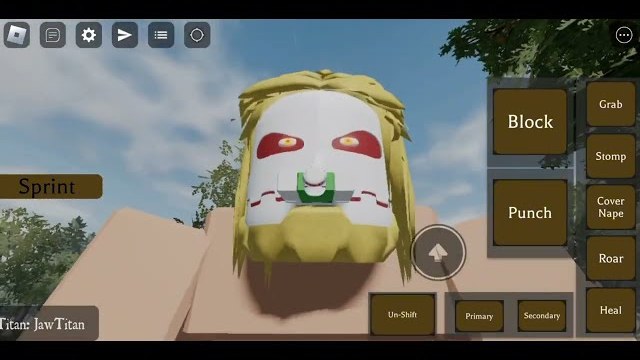
Attack on Titan Paradis supports mobile. The same Roblox page that says so also says low-end devices may not run well. That sentence is not flavor. ODM is a two-thumb minigame, titan models are huge, and Marley’s remodeled streets already stress a mid-range phone. This guide is for people who will play on a screen anyway.
PC habits do not port. You cannot hover a mouse over a nape and tap Q and E as two distinct keys unless you attach a keyboard. You have ODMG buttons. The map rework reworked those buttons because the old layout was the number one complaint in ODM tutorial comments: cannot fire both grapples, cannot unhook, have to tap aggressively to release.
Set up the HUD before you fly
- Lower graphics until the area select menu is smooth. Paradis, Marley, and Another Forest all stream heavy meshes.
- Enable whatever shift-lock / camera assist the current build offers so your right thumb is not glued to look.
- Find left hook, right hook, boost, attack, reload, titan select, transform. If a control is missing, rotate the device and look again — some buttons only appear after you equip gear.
- Equip ODM at spawn. Touch clients skip this more often than PC because the prompt is small. Getting started still applies.
If the HUD covers the nape, you will never learn how to kill titans. Move buttons in Roblox’s touch layout if the game allows it. If it does not, accept a claw grip or stop taking fights in the bottom-right quadrant of the screen.
Dual hooks on a phone
The dream is both grapples at once. The nightmare is one hook stuck in a roof.
- Tap left, tap right, then boost. Do not boost on a single accidental wire.
- To unhook, tap the lit ODMG button again. Holding does not always release. Commenters literally said they had to tap aggressively; the rework was supposed to make this less cursed, not magical.
- If a hook ignores you, you are out of gas or the button is under another UI chip (Roblox chat, the titan portrait, the health bar from showcases).
Practice on walls in Another Forest. Trees are vertical and the ground is obvious when you fail.
Transforming on touch
Follow how to transform: choose titan, equip gear, press transform. On phones the select panel is easy to miss after death. If it does not accept taps, leave and rejoin. That bug is not a mobile-only bug, but touch makes it look like you “missed” the button.
Colossal on a phone is a camera problem. The model fills the screen. Transform in open space. The rotation bug was patched; your thumbs were not.
Performance
- Close overlay recorders. This game already fights for GPU.
- Avoid 20-player Colossal duels on a three-year-old Android if you care about nape timing.
- When the server hitch-steps, unhook. Hitch plus a live wire yeets you into the skybox.
- Shutdowns still mean updates. After a patch, re-check button positions before you blame your device.
The official listing has no voice chat. You will not call napes. You will ping by roaring if you are a titan, or by dying if you are not.
What not to do on mobile
- Do not buy Private Server Extra hoping fly commands will teach you ODM. They teach you to skip ODM.
- Do not install a mobile executor because a hub promised infinite gas. Read script safety first; Android executors are a separate risk pile.
- Do not chase codes mid-swing. There are none active, and the on-screen keyboard will eat your unhook.
- Do not main Warhammer on a 5-inch screen until you can land a secondary on PC or tablet. The kit already needs extra inputs.
A mobile-only first hour
0–10 minutes: HUD and graphics. No fights.
10–25 minutes: hook-unhook drills from controls.
25–40 minutes: nape passes on slow targets.
40–50 minutes: one shifter life with Attack Titan.
50–60 minutes: stop. Thumbs cramp, and cramp is how you feed Jaw.
If after that hour you still cannot unhook, it is the layout, not your soul. Recheck the ODMG buttons, update the app, and try a tablet if you have one. The how to play loop is the same as PC. The thumbs are not.
Console players can skim this page for HUD sympathy, then follow in-game prompts added in the same patch. Phones and gamepads share one truth: you have fewer precise buttons than a keyboard, so you must spend them on release and boost, not on decorative UI.
Play Paradis on mobile if that is where you actually log in. Just do not pretend it is the same game as mouse ODM until the nape box is large on your screen.
Frequently Asked Questions
Quick answers from the Attack on Titan Paradis wiki.
Can I play Attack on Titan Paradis on mobile?
Yes. Official support exists, with a warning for low-end devices. The map update reworked ODMG buttons for touch.
How do I use both grapples on a phone?
Tap each ODMG hook control. If one never fires, the button is covered or gear is empty. See the dual-hook section above.
How do I unhook on mobile?
Tap the active grapple button again. Holding often keeps the wire stuck.
Is Colossal playable on a phone?
Yes but the camera is brutal. Transform in the open and consider Attack Titan first — beginner picks.